Case Study | Strata Critical / Trinity Medical

A Realtime System for Hospitals to Track Organ Transplants
Project Overview

I designed the customer-facing dashboard for Trinity's organ transport logistics platform, enabling transplant coordinators to submit and track time-critical organ transports without relying on phone calls, eliminating manual data entry errors, and providing real-time visibility for hospitals and administrators managing multiple active cases simultaneously.

Client

Strata Critical / Trinity Medical

Industry

Healthcare Logistics

Year

2025-2026

Role

Lead Product Designer
About the Project

Summary

A real-time logistics platform for organ transplant coordination

Trinity Medical Solutions coordinates the transportation of organs, medical teams, and specimens for transplant procedures across the United States. Every transport is time-critical. Organ viability windows are measured in hours, and delays can mean the difference between life and death.

The Problem

Create a web interface for creating and monitoring transplant orders

Hospital coordinators still relied exclusively on phone calls and emails to request transports and track their status. The manual process created multiple pain points:

  • For clients: Time-consuming phone calls during emergency situations when every minute counts.

  • For Trinity Staff: Manual data entry for every request, increasing the risk of errors in time-critical logistics.

  • For both: Frequent status update calls, pulling staff away from coordinating transports,

The business case was clear: a self-service portal would eliminate communication bottlenecks and reduce operational overhead, but only if it could handle the complexity of multi-leg, time-critical medical logistics."

Phase 1:

Understanding the System

Mapping the Complexity

Before redesigning anything, I needed to understand the full scope of what Trinity's system needed to handle. I worked closely with the product and operations teams to map out the workflows, constraints, and edge cases.

The system had to manage:

Multiple service types

Organ, medical team, and specimen transport.

Complex Logistics

Multi-leg journeys combining ground and air transport, with real-time tracking across all legs.

Time-critical decisions

Organ transport requires times be accurate and updated frequently.

Multiple user types

Organ transplant coordinators, surgeons, and more.

Phase 2:

Redesigning the Service Request Flow

From Overwhelming Forms to Progressive Disclosure

The existing service request flow was a two-column layout with numerous input fields all visible at once. For coordinators trying to quickly submit a life-saving transport request in an emergency situation, this created unnecessary cognitive load and increased the likelihood of errors—a critical concern when incorrect pickup addresses or missing medical team information could delay procedures.

I redesigned this as a 11-step progressive flow, with each step logically grouped around a specific aspect of the request:
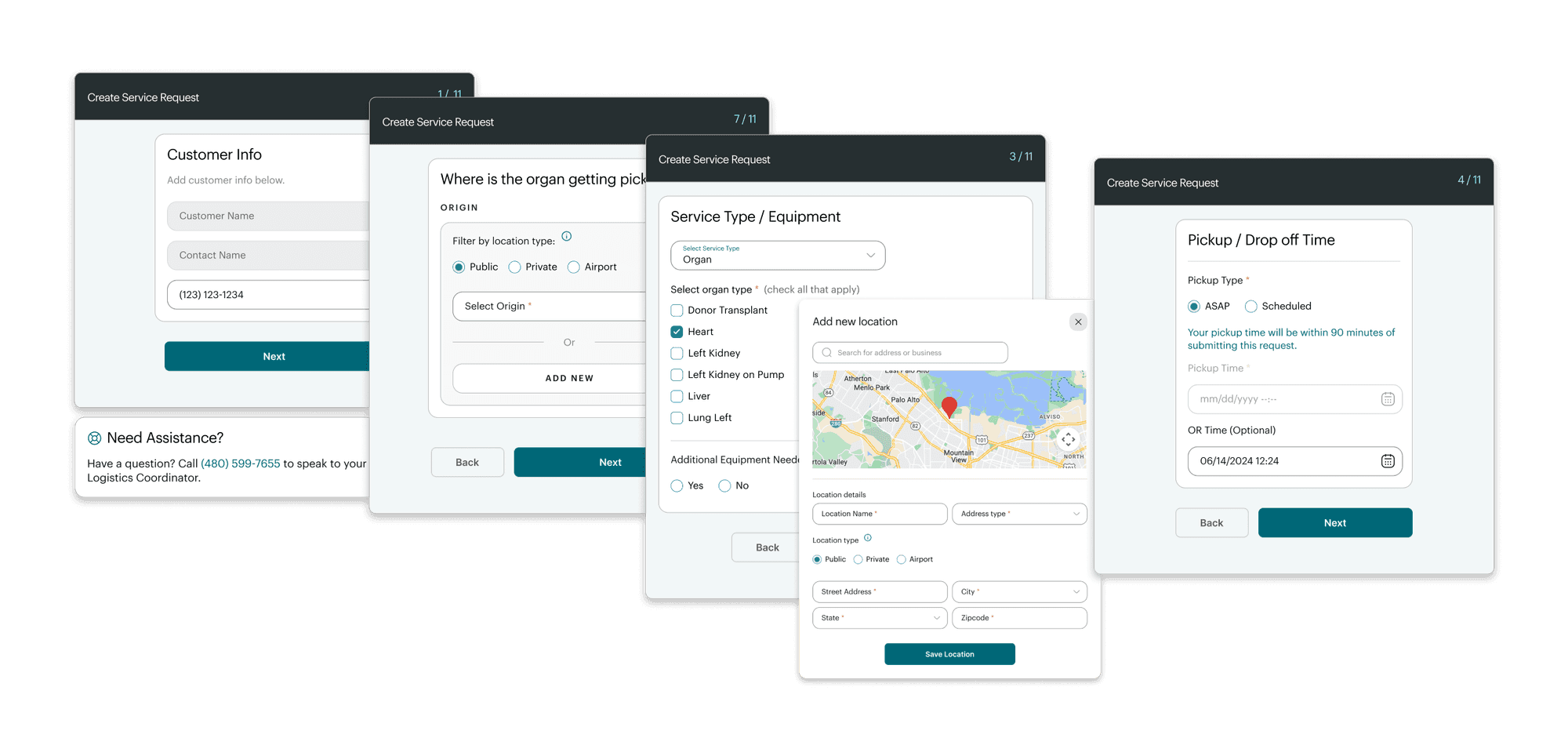
1 | Customer info

Basic contact details

1 | Customer info

Basic contact details

2 | Template selection

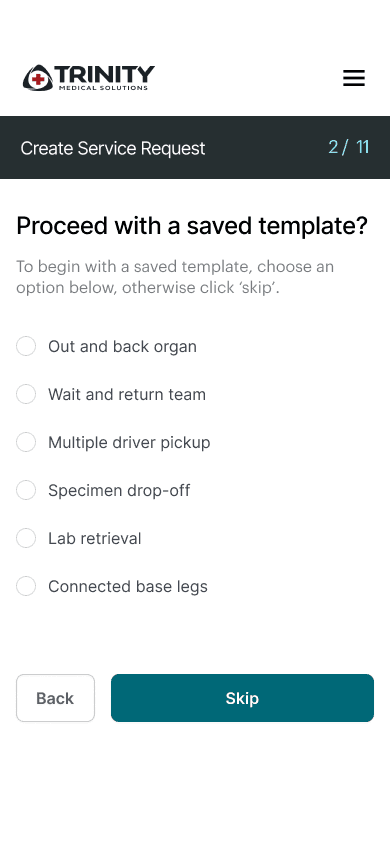
Choose from saved templates for repeat routes (a time-saving feature I introduced)

2 | Template selection

Choose from saved templates for repeat routes (a time-saving feature I introduced)

3 | Service type & organ selection

What's being transported, with conditional fields based on selection

3 | Service type & organ selection

What's being transported, with conditional fields based on selection

4 | Pickup timing

ASAP vs scheduled, with intelligent defaults

4 | Pickup timing

ASAP vs scheduled, with intelligent defaults

5 | Additional details

Donor type, emergency equipment needs

5 | Additional details

Donor type, emergency equipment needs

6 | ID Information

UNOS numbers, tissue IDs, regulatory compliance

6 | ID Information

UNOS numbers, tissue IDs, regulatory compliance

7 | Team Members

Add medical team with weights (required for aircraft planning).

7 | Team Members

Add medical team with weights (required for aircraft planning).

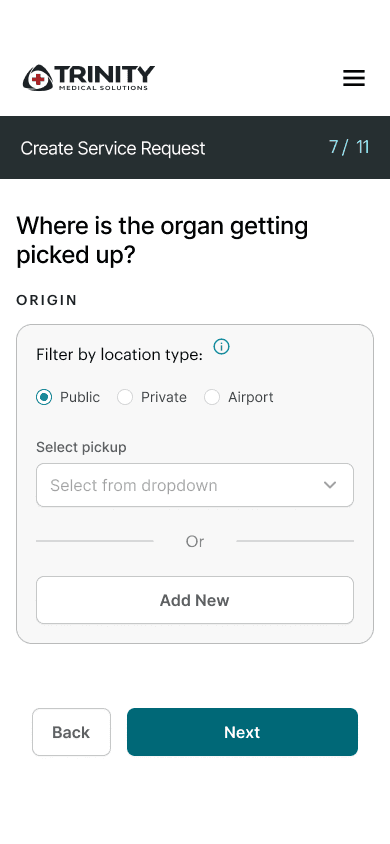
8 | Origin

Where the organ/team is being picked up

8 | Origin

Where the organ/team is being picked up

9 | Destination

Where they're going

9 | Destination

Where they're going

10 | Notes & Files

Add files and notes for the team.

10 | Notes & Files

Add files and notes for the team.

11 | Review and Submit

And save as template.

11 | Review and Submit

And save as template.

1 | Customer info

Basic contact details

2 | Template selection

Choose from saved templates for repeat routes (a time-saving feature I introduced)

3 | Service type & organ selection

What's being transported, with conditional fields based on selection

4 | Pickup timing

ASAP vs scheduled, with intelligent defaults

5 | Additional details

Donor type, emergency equipment needs

6 | ID Information

UNOS numbers, tissue IDs, regulatory compliance

7 | Team Members

Add medical team with weights (required for aircraft planning).

8 | Origin

Where the organ/team is being picked up

9 | Destination

Where they're going

10 | Notes & Files

Add files and notes for the team.

11 | Review and Submit

And save as template.

Key Design Decisions

Some additional key design decisions that went into the progressive redesign of the service request submission flow were:
Template System

I recognized that hospitals often request similar routes repeatedly (e.g., a major transplant center might frequently send teams to the same regional hospitals). By introducing a template system early in the flow, power users could skip ahead and only modify what's different, potentially saving 5+ minutes per request.

Template System

I recognized that hospitals often request similar routes repeatedly (e.g., a major transplant center might frequently send teams to the same regional hospitals). By introducing a template system early in the flow, power users could skip ahead and only modify what's different, potentially saving 5+ minutes per request.

Conditional Logic

Different service types require different information. Organ transport needs tissue IDs; medical team transport needs passenger details. The flow adapts based on earlier selections, reducing clutter and preventing errors.

Conditional Logic

Different service types require different information. Organ transport needs tissue IDs; medical team transport needs passenger details. The flow adapts based on earlier selections, reducing clutter and preventing errors.

Map Integration and Mobile Optimization

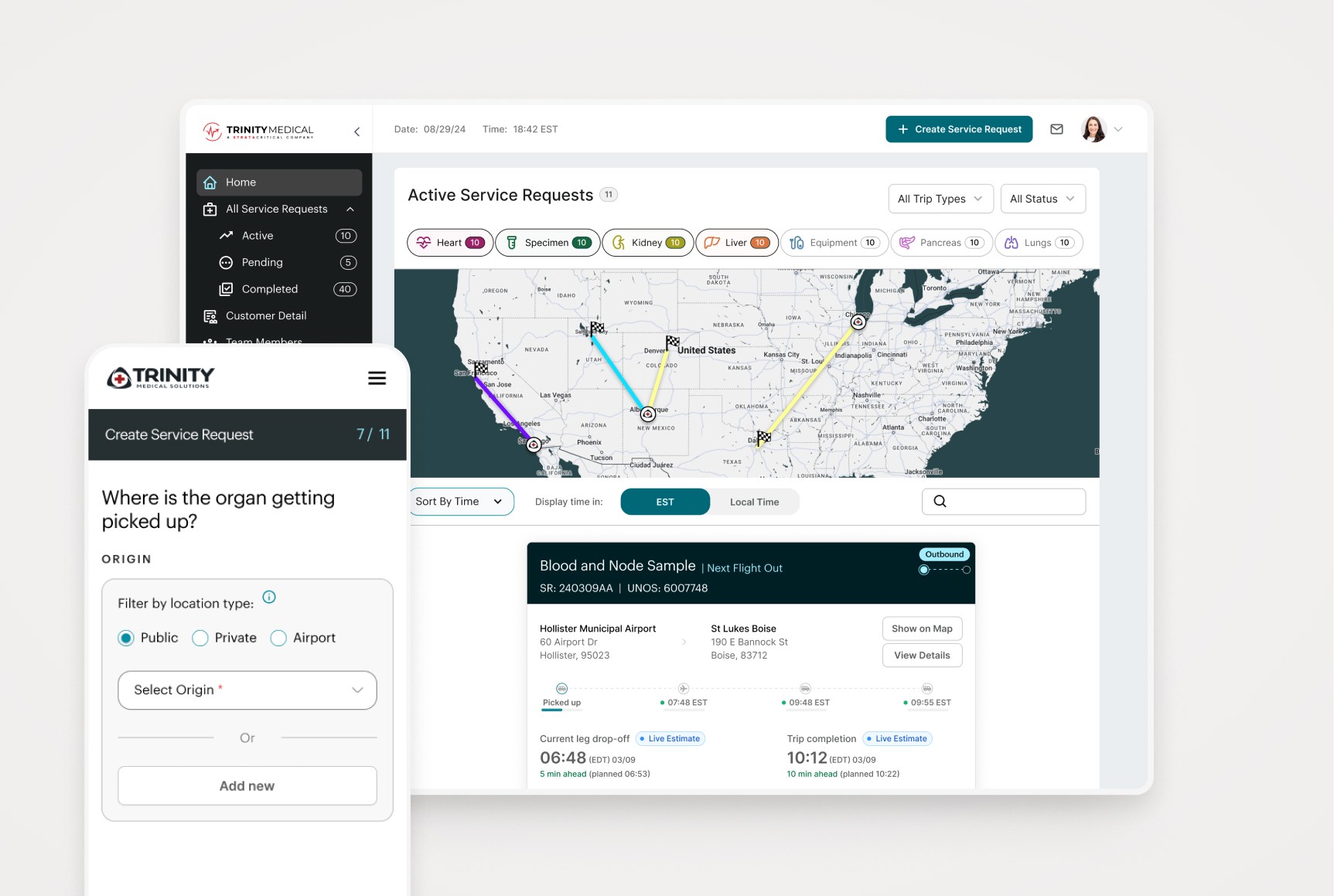
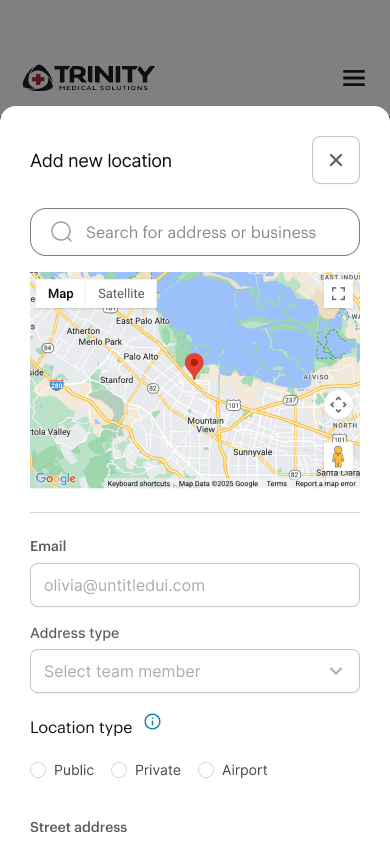
For origin and destination entry, I integrated map search and validation. The map provides visual confirmation while users are still in the flow. The progressive nature of the new service request flow mapped easily to mobile and a constrained screen size.

Map Integration and Mobile Optimization

For origin and destination entry, I integrated map search and validation. The map provides visual confirmation while users are still in the flow. The progressive nature of the new service request flow mapped easily to mobile and a constrained screen size.

Phase 3:

Real-Time Dashboard & Status Intelligence

Designing for Time-Critical Decision Making

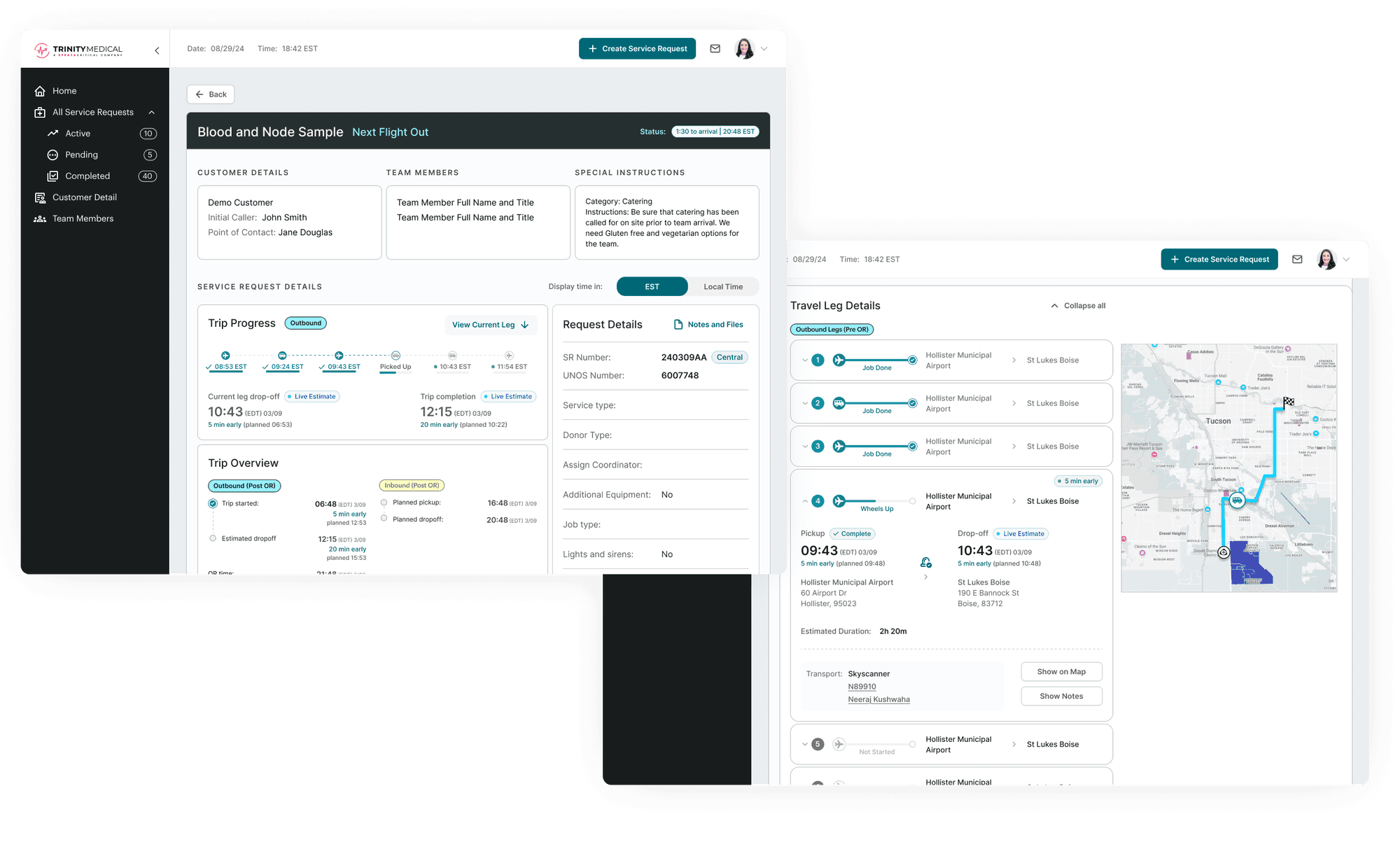
The dashboard prioritizes real-time information — what's happening right now with active transports. Visual filtering by organ type and a color-coded map overview help coordinators manage multiple cases simultaneously. The critical design decision was distinguishing outbound (traveling to retrieve) from inbound (returning with organ) transports, because they represent fundamentally different workflows.

The ETA cascade logic system

One of the most complex design challenges was handling real-time updates to estimated arrival times. This required strategic thinking about how to represent system state, not just display data.

The Problem | Time representation

When a service request is created, coordinators enter planned times. But once the transport starts, reality sets in: traffic delays, weather, aircraft availability. If the first leg is delayed by 20 minutes, every subsequent leg's timing shifts.

The Solution | Intelligent Status Badges

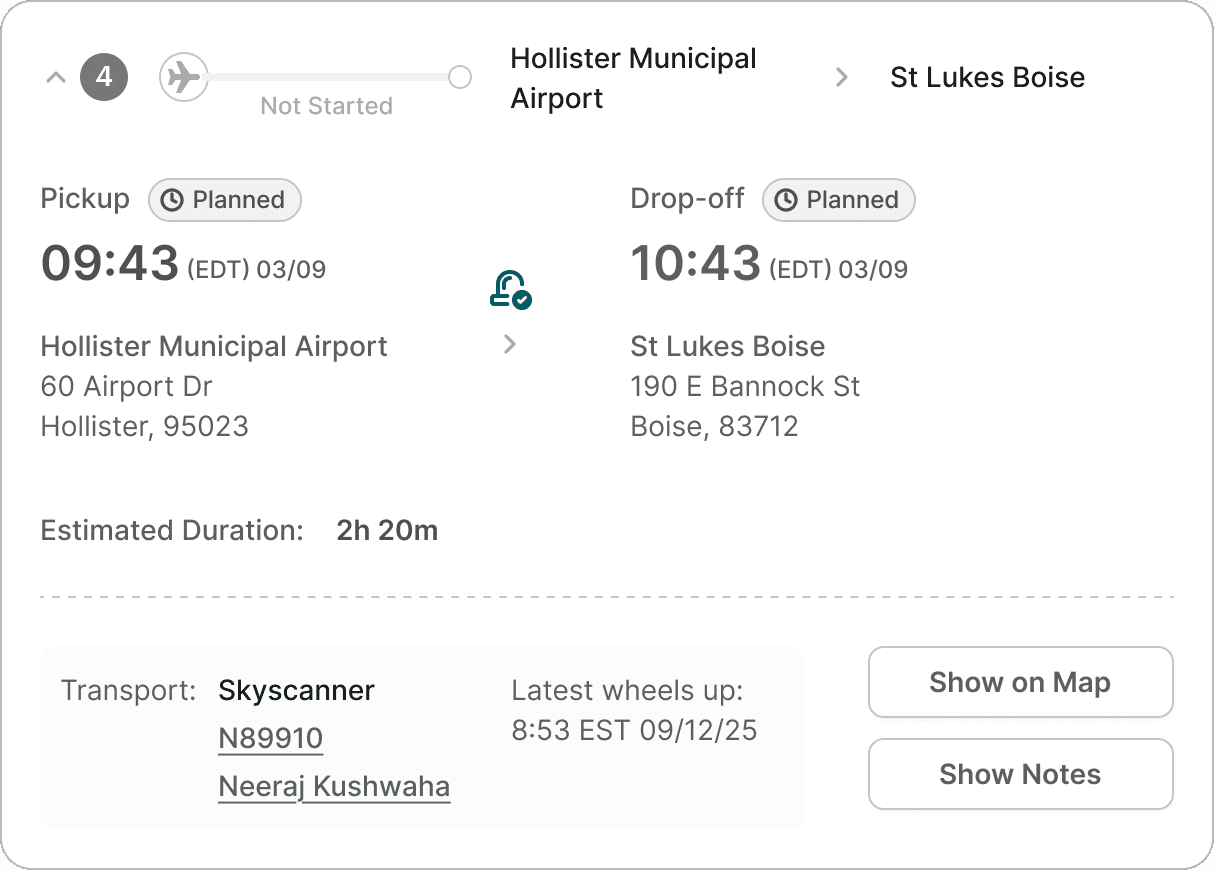
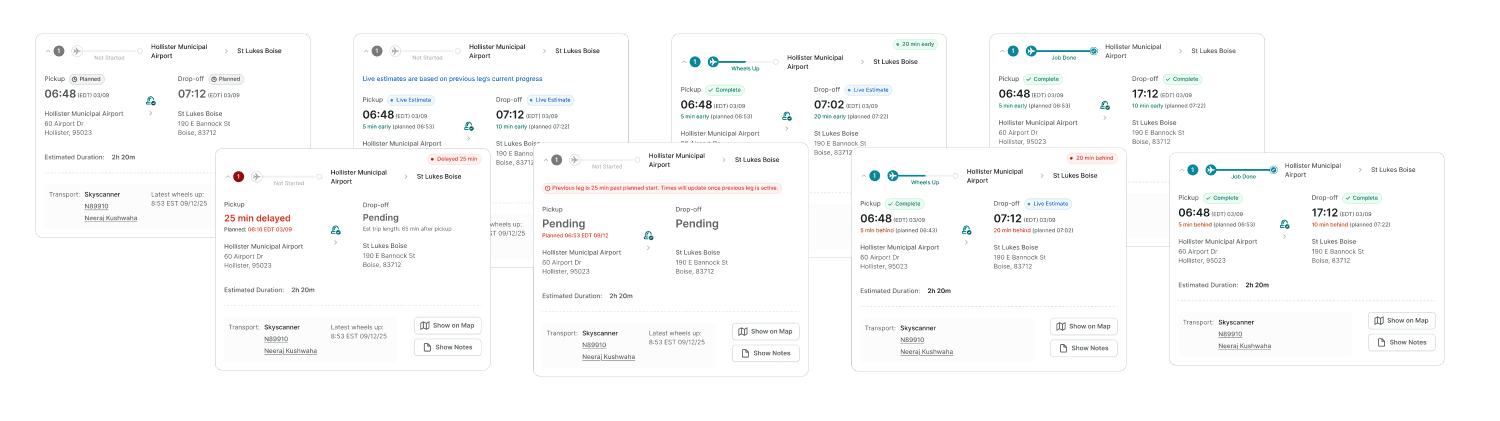
I designed a system of status indicators that automatically adapt based on GPS tracking and route calculation:
Planned Time

Before the leg starts—these are estimated times entered during the trip creation process. Represented with a gray badge.

Planned Time

Before the leg starts—these are estimated times entered during the trip creation process. Represented with a gray badge.

Planned Time

Before the leg starts—these are estimated times entered during the trip creation process. Represented with a gray badge.

Live Estimates

Once GPS tracking is active, the system calculates real-time arrival based on current location and traffic. The dot reinforces the "live" nature of this data.

Live Estimates

Once GPS tracking is active, the system calculates real-time arrival based on current location and traffic. The dot reinforces the "live" nature of this data.

Live Estimates

Once GPS tracking is active, the system calculates real-time arrival based on current location and traffic. The dot reinforces the "live" nature of this data.

Time variance indicators

Green: On schedule (within 5 minutes)

Yellow: Moderate delay (5-15 minutes behind)

Red: Significant delay (15+ minutes behind)

Time variance indicators

Green: On schedule (within 5 minutes)

Yellow: Moderate delay (5-15 minutes behind)

Red: Significant delay (15+ minutes behind)

Time variance indicators

Green: On schedule (within 5 minutes)

Yellow: Moderate delay (5-15 minutes behind)

Red: Significant delay (15+ minutes behind)

Outbound / Inbound Logic

For outbound legs (going to get the organ), these time estimates and variance indicators are relevant because there's a planned schedule.

For inbound legs (returning with the organ), the concept of "on time" becomes irrelevant—the goal is simply "as fast as possible." So for inbound transports, I simplified the display to show only the most critical information: when are they expected to arrive at the final destination?

This distinction reflects an understanding of the actual workflows and what coordinators need to know in each scenario.

Outbound / Inbound Logic

For outbound legs (going to get the organ), these time estimates and variance indicators are relevant because there's a planned schedule.

For inbound legs (returning with the organ), the concept of "on time" becomes irrelevant—the goal is simply "as fast as possible." So for inbound transports, I simplified the display to show only the most critical information: when are they expected to arrive at the final destination?

This distinction reflects an understanding of the actual workflows and what coordinators need to know in each scenario.

Outbound / Inbound Logic

For outbound legs (going to get the organ), these time estimates and variance indicators are relevant because there's a planned schedule.

For inbound legs (returning with the organ), the concept of "on time" becomes irrelevant—the goal is simply "as fast as possible." So for inbound transports, I simplified the display to show only the most critical information: when are they expected to arrive at the final destination?

This distinction reflects an understanding of the actual workflows and what coordinators need to know in each scenario.

Before and After

The Transformation From Functional to Strategic

A functional prototype was in place when I first came on board the project, but I rethought the UX and UI from the ground up.

Before
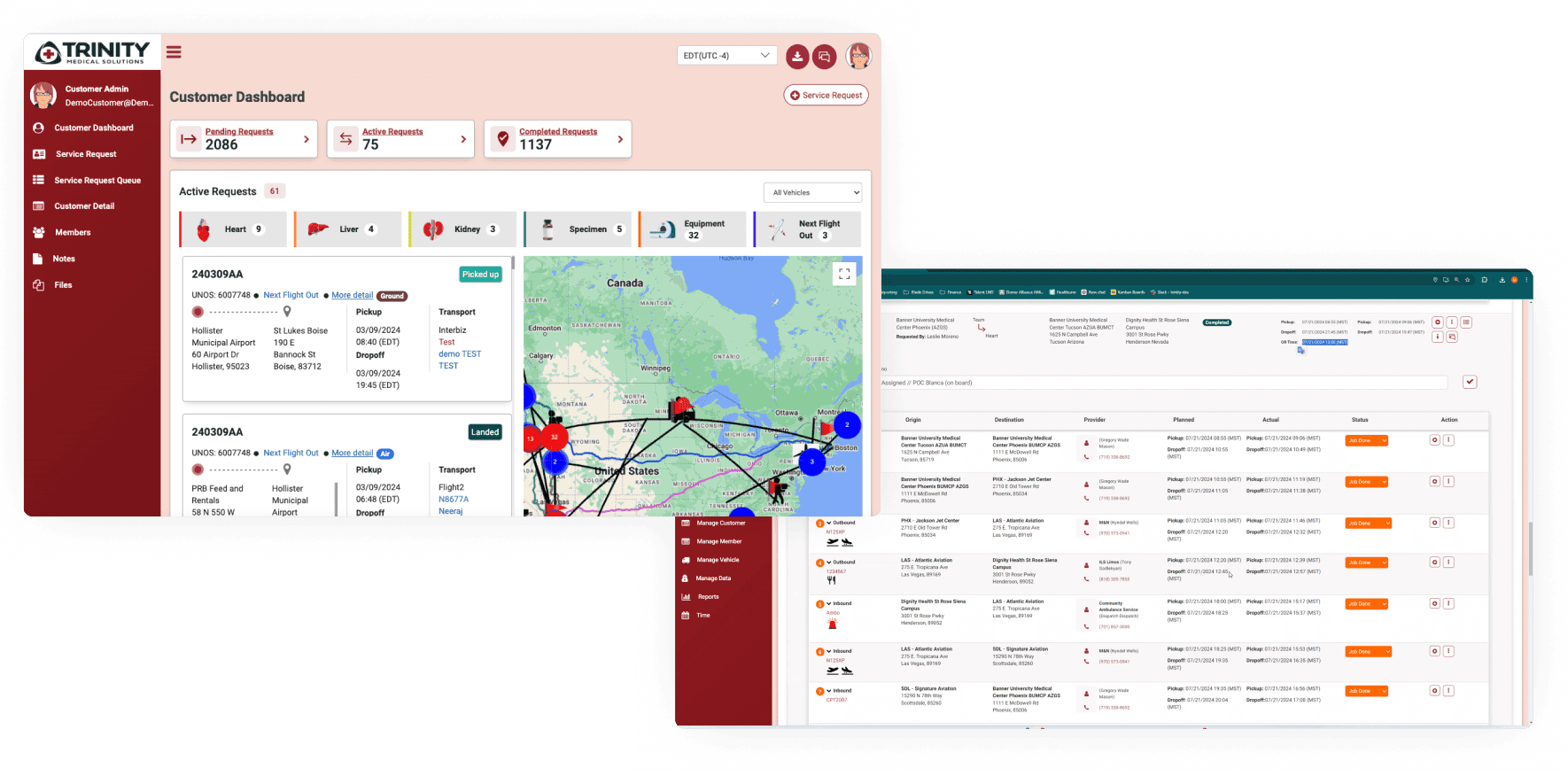
The original interface showed some information but without strategic design:

  • Dense, text-heavy cards difficult to scan

  • No visual hierarchy or color coding

  • Map cluttered with all transports simultaneously

  • No intelligent status differentiation

  • Buried information requiring excessive clicking

After
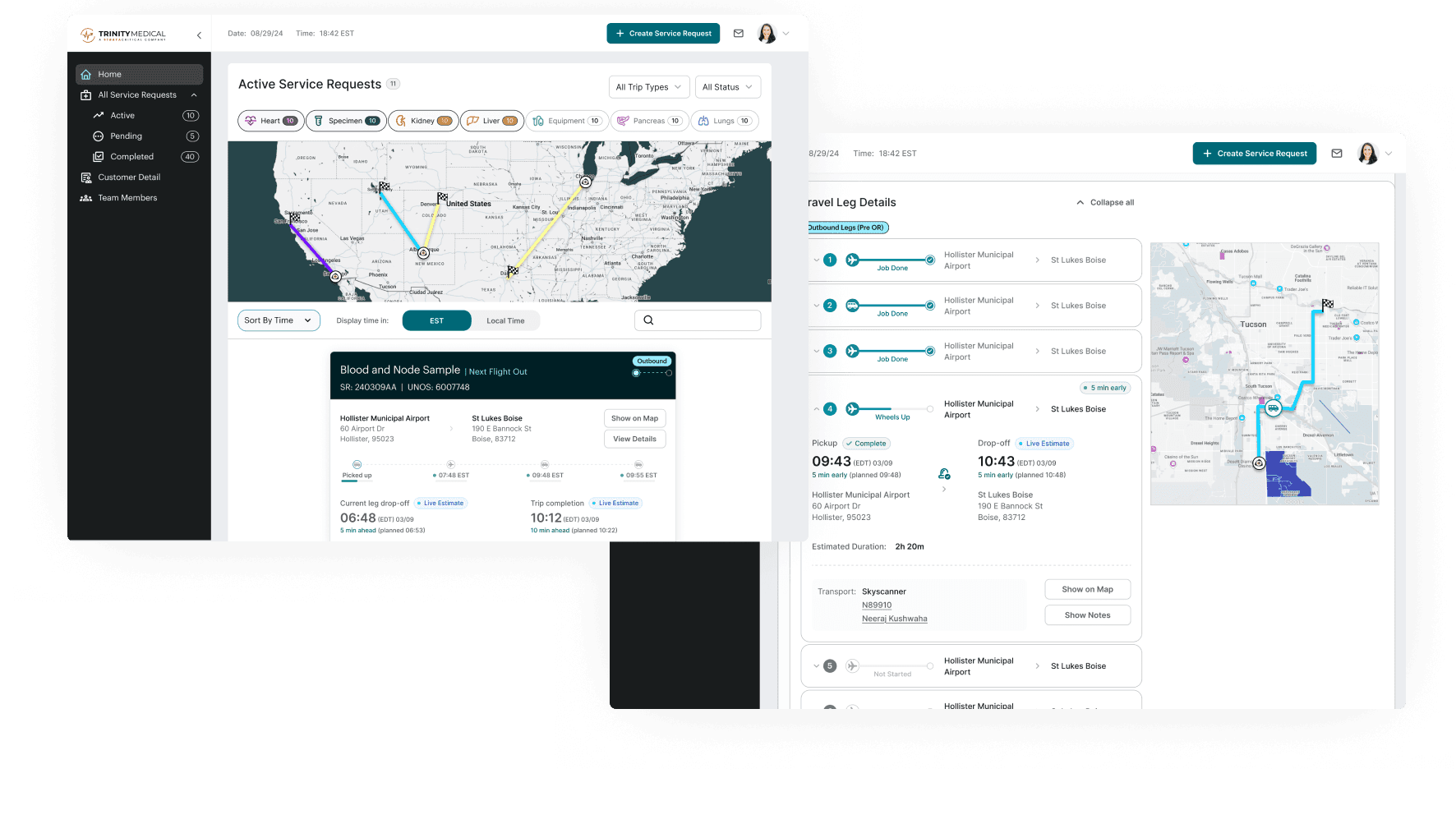
The redesigned system prioritizes decision-making:

  • Clear visual hierarchy with status badges

  • Intelligent color coding for outbound/inbound

  • Filterable map with route visualization

  • Progressive disclosure reducing cognitive load

  • Real-time updates with variance indicators

Design Impact

System Impacts Delivered

The fundamental shift from manual to self-service represents a scalable operational foundation for Trinity's growth.

The redesigned platform enabled Trinity to:

Shift service requests online

Eliminating phone-based booking for routine transports.

Provide self-service status tracking

Reducing coordination overhead for internal staff.

Handle edge cases systematically

Delays, cancellations, route changes) that previously required manual intervention.

Scale operations

With a system designed to support Trinity's growth.

Project Takeaways

Redesigning Trinity's transport dashboard taught me that complex systems design isn't about displaying all the data — it's about representing the right information at the right moment.

The biggest insight was recognizing that outbound and inbound transports are fundamentally different problems. Same organ, same route, completely different workflows. Outbound follows a schedule; inbound is "get there as fast as possible." That distinction shaped everything from color coding to which timing indicators even made sense to show. Understanding when to hide information is as important as knowing what to surface.

Real-time systems also required different thinking than static interfaces. The cascade logic, live estimate badges, and variance indicators work together to communicate system state — not just "here's the data," but "here's what's happening right now and whether you need to act." In time-critical logistics, a coordinator glancing at the dashboard needs to immediately know if everything's on track or if something needs attention.
Interested in Working Together?

Have a project I can help with? Have a question about something on my website? Reach out below.

Interested in Working Together?

Have a project I can help with? Have a question about something on my website? Reach out below.

Interested in Working Together?

Have a project I can help with? Have a question about something on my website? Reach out below.